
Vibe Coding: How I Used AI to Build a Mobile App — Until Compliance Broke the Flow

(Originally Published on Medium.com)
I love to cook, but I rarely have recipes for food I like to eat (Asian, Mediterranean, etc.). When AI assistants hit the mainstream, I found myself prompting them for simple recipes from my favorite dishes or low-sodium, low-sugar recipes for others using whatever ingredients I had on hand or excluding the ones I didn’t.
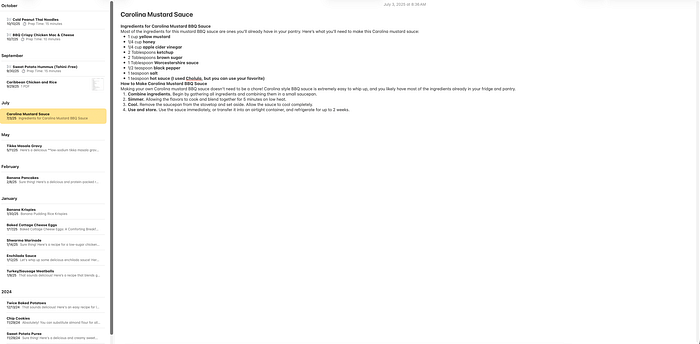
Copy-pasting those outputs into Apple Notes worked for a while, but soon I had an unindexed mess. That’s when the idea struck: why not build an app that bridges recipe generation with structured storage? My Head Chef was born — and it became my test case for Vibe Coding.
I. Finding the Flow in Code
Everywhere I turn, I see the term Vibe Coding. The idea is simple: stop being a line-by-line coder and instead become an architect, guiding a large language model (LLM) to build software from intent.
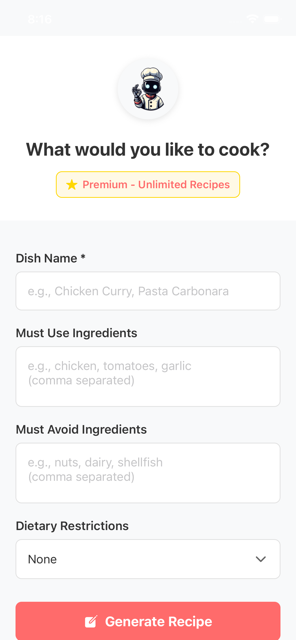
I wanted to see what the hype was about, so I sat down to build My Head Chef — an AI-powered cooking assistant with recipe generation, an offline-first shopping list, and community sharing features.
With tools like Kiro and GitHub Copilot (and Gemini and Claude), the scaffolding appeared almost instantly. The architecture — from FIFO shopping list management to Azure Functions for community sharing — materialized in hours, not weeks. For a while, it felt like pure flow state.
II. The Vibe Killer: Monetization & Compliance
At first, it was like magic — UI appeared out of the ether and ran in simulators with zero touch. However, the magic ended at the least creative layer: monetization.
Implementing In-App Purchases (IAP) revealed the limits of AI scaffolding. The assistants generated confident, production-ready code — but often based on outdated APIs.
API Confusion
AI suggested deprecated structures while the latest SDKs required completely different implementations — or had been replaced by a different library entirely. Debugging meant manually comparing SDK source against AI output line by line.
Platform Specificity
Android and Apple each had compliance requirements the AI never flagged:
- Android: AI-generated code didn’t handle the nuance that prevents purchases from auto-refunding after three days. Fixing it required overriding the AI and implementing the modern API call directly.
- Apple: App Store policy requires a “Restore Purchases” button immediately adjacent to the purchase option. Rejections piled up even after I added the restore logic — I ultimately had to redesign the entire purchase flow to satisfy the requirement. No AI suggested this defensive compliance layer.
The result: 114 commits to fix what AI scaffolding couldn’t.
III. Lessons Learned
I worked out the issues, shipped the first version, and passed Apple review. It took a village of tools — Kiro and GitHub Copilot primarily, with Google Gemini and Claude.ai for ad hoc requests — but I built an app start to finish with very little manual programming. That said, I don’t think this type of coding is ready for the masses just yet. Here are my top takeaways:
1. AI is scaffolding, not compliance.
It accelerates prototyping but falters at the last 2% where platform rules and money intersect.
2. You need technical fluency.
A technical background is essential for anything beyond a smoke-and-mirror prototype. My programming background helped me understand generated code and troubleshoot when the AI was confidently wrong — which happened often. The agents regularly used outdated APIs, picked the wrong tool for the job, and seemed rushed to complete tasks rather than complete them correctly.
Navigating package managers, GitHub repositories, and API documentation is genuinely complex. It would be extremely difficult for non-technical users to guide an AI agent through these corrections.
3. Spec-Driven beats Vibe-Driven.
Defining specs up front ensures consistency and compliance. After too many surprises, I switched to a Spec-Driven Vigilante approach.
The painful shift — hunting down parameter structure changes, fixing Android discrepancies, implementing Apple’s mandatory restore logic — wasn’t creative. But it yielded the superior output: an app that passes review, holds onto user payments securely, and is a real, sustainable product.
Here’s the trap: ask an agent to “build me a screen with a form that sends data to an endpoint” and you’ll get something. But the agent chooses everything — the UI framework, the protocol, when and how calls are made, the guiding principles, the priorities. And chances are high it won’t align with what you meant. Establishing boundaries and standards up front saves significant time later when the work gets genuinely complex.
IV. Final Thoughts
Despite the IAP saga, I loved developing this way. As someone who started with CGI scripts and Classic ASP, AI-assisted scaffolding makes me relevant again as an architect.
AI won’t replace humans. It enables architects and engineers to work smarter — if they enforce specs, compliance, and governance. Good engineering principles are enduring regardless of your age or the language you’re working in. I may not know React Native like I know C#, but I know how to speak software development. That background, paired with spec-driven tooling (I settled on GitHub Copilot with GitHub Spec-kit), made for a fulfilling and genuinely creative experience.
Where it really shone: it broke down the barrier of needing to know a specific language or library. It brought all of software development to my fingertips — as long as I set the right guardrails.
TL;DR — AI isn’t ready to let “Joe from marketing” vibe an app into production. Flow is fun, but vigilance is survival. Now, excuse me while I spec out the next release.
